

The most interesting prospect for Kling 4.0 is more precise control over a video: when an action happens, how a character or product stays recognizable, and who delivers each line. Public posts from late September offer some early clues about that direction.
As of September 28, 2026, our research has not located an official announcement confirming a Kling 4.0 launch date and complete specifications. This preview is for creators planning ads, short films, and social videos. It examines the public material, considers possible uses, and provides a storyboard you can prepare now. All 4.0 specifications below are unconfirmed test indications; the workflow ideas are our analysis, not hands-on results.
Where do the Kling 4.0 reports come from?
On September 24, MarsForTech publicly mentioned 4.0 Preview and 4.0 Flash Preview. Esteban Diba's post and attached images showed an interface labeled VIDEO 4.0 Preview with duration and keyframe controls. Kol Tregaskes's summary attributed further details to the Dev Mode community.
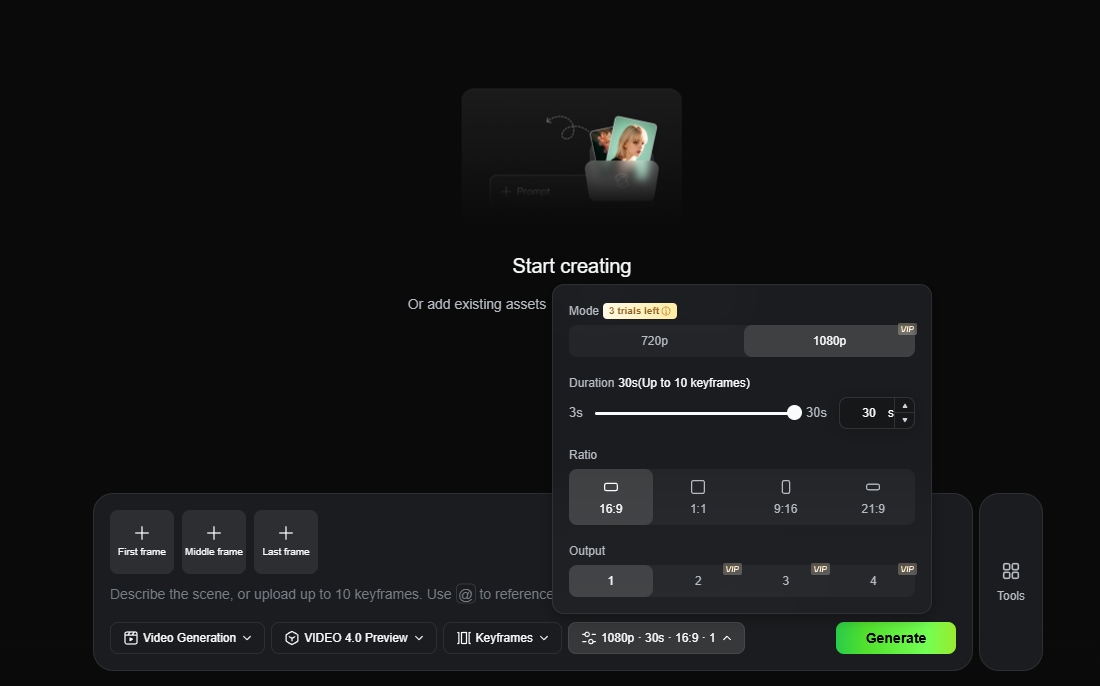
Source: image attached to Esteban Diba's public post on September 24, 2026. The Preview settings include first, middle, and last-frame inputs.
For an established baseline, Kuaishou's Kling 3.0 announcement confirmed clips up to 15 seconds, multi-shot storytelling, and native audio. A useful next generation should improve concrete parts of the creative process.
Six possible upgrades worth watching
1. Longer generations could give an action room to finish
The settings image published by Diba shows a 3–30-second range for the ordinary mode. If that reaches release, creators could fit a setup, an action, and a payoff into one clip.
A coffee-cup ad could establish a sunlit table, move closer to the cup, and settle on a product shot. Extra time could reduce the need to join separate clips simply to reach the desired length.
Longer duration alone does not establish better storytelling. After launch, check whether the handle, decoration, and lighting remain consistent toward the end, and whether the action unfolds in the intended order.
2. Multiple keyframes could give the middle of a shot a visual target
The same image includes first, middle, and last-frame inputs, with a limit of 10 keyframes indicated. For a creator, that may be more consequential than extra seconds.
Multiple intermediate targets could specify where a shot starts, what composition it passes through, and where it ends. For the cup ad, you might prepare a wide view, a closer view of the decoration, and a closing composition with space for copy.
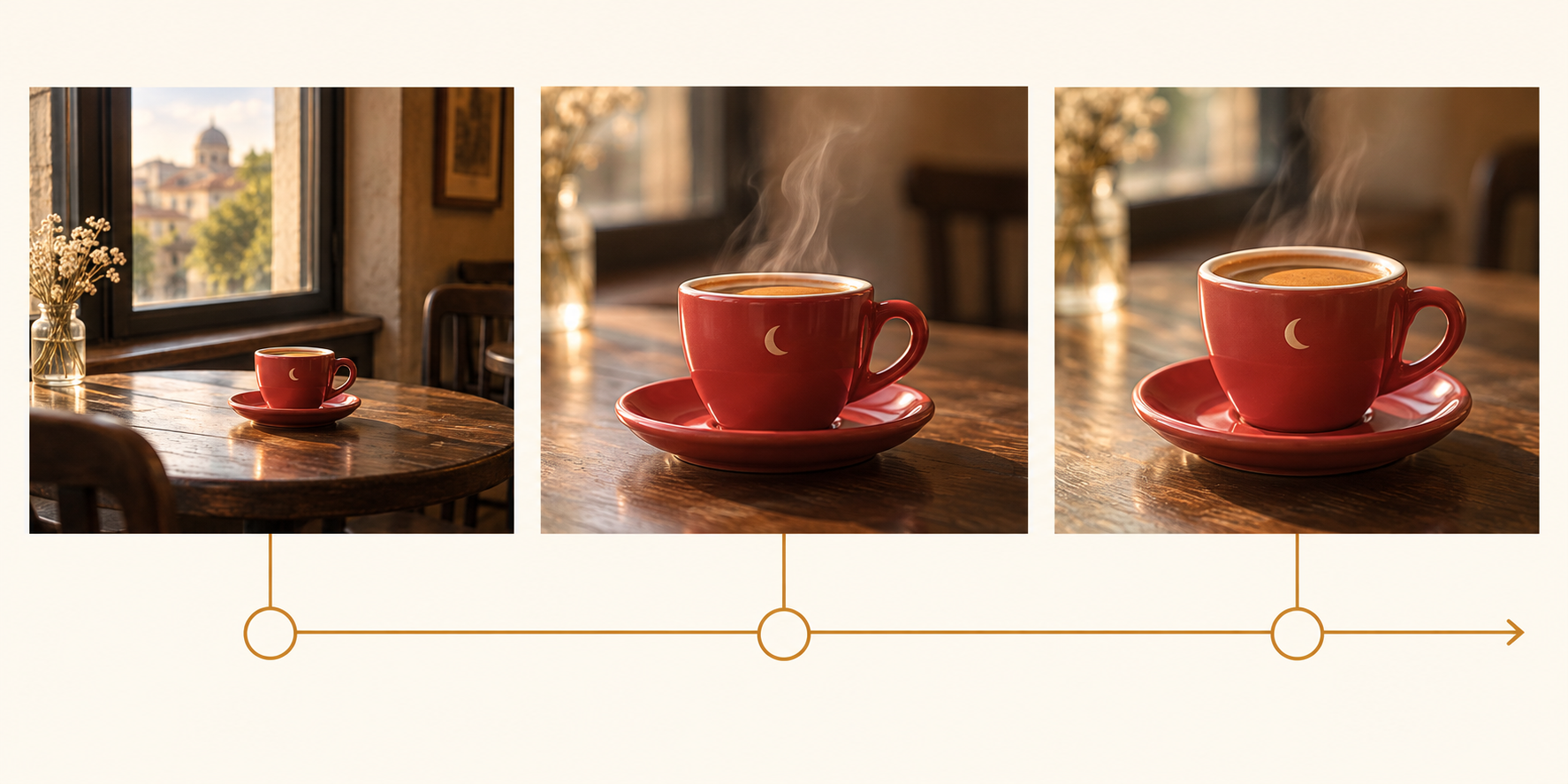
Keyframe planning concept: define the opening, middle, and final visual targets from left to right. This diagram and the cover are AI-generated editorial illustrations, not Kling 4.0 outputs, official interface images, or performance tests.
You can prepare and adjust those references in the Nano Banana 2 image editor, then manually check the cup shape, decoration, and lighting. Resolve inconsistencies in the stills before taking them into video generation.
3. Richer references could make characters and products easier to specify
Kol's public summary describes a combined allowance of 15 reference items for the ordinary reference workflow. Treat that as a total, not a sum of separate media limits, and do not assume it applies to the experimental long-video mode.
If delivered, this could let an advertiser specify product appearance, a character's wardrobe, the setting, and motion separately. Its potential value is reducing ambiguity; adding more files is not automatically better.
Assign each reference a clear job. Decide which governs shape, which defines color, and which supplies composition only. If a product photograph has a distracting background, you can remove the product image background while keeping a separate full-scene reference.
4. Voice references could help recurring characters stay recognizable
The same summary mentions up to three voice references. If supported in the release, this would be worth examining for regular presenters, recurring characters, and dialogue-driven ads.
A voice-reference input does not establish reliable conversation. Start with two speakers, assign their lines and speaking order, and check for voice swapping, unwanted interruptions, and lip-sync problems. Use voice references you have permission to use.
5. Flash could offer a separate option for exploring ideas
The community note lists preliminary Flash settings of 3–20 seconds at 720p. From the naming and narrower settings, we infer that it may target quicker exploration; its speed, price, and quality trade-offs remain unverified.
One possible workflow would compare three ad openings: show the product immediately, establish its setting first, or begin with a small mystery. Once the direction works, decide whether another mode is better for the final material.
Measure the total time and cost required to obtain a usable shot, including retries. A cheaper individual generation can still be a poor fit if it creates more rework.
6. Experimental long video and extension could develop an existing scene
Kol's post also describes an experimental 120-second long-video mode and extension in both directions. The community note gives long video its own reference restrictions, so the strongest limits from different modes should not be combined into one imagined specification.
The attraction is being able to develop a scene that already works: continue an ad into a product reveal, or add an establishing moment before an existing shot.
For longer material, continuity is the useful test. Check whether a character changes between sections, props disappear, or motion and sound fail to connect. Dividing a film into reviewable sequences would remain a sensible production approach.
How should you interpret 4K, 8K, and Image 4.0?
Video and still-image resolutions need separate treatment. The 4.0 video settings image we inspected shows 720p and 1080p. That neither rules out eventual 4K support nor establishes native 4K at launch.
Kling's own article already says native 4K video arrived for the 3.0 series on April 23, 2026. “4K” alone therefore cannot be presented as an exclusive 4.0 advance.
The same public material also mentions batch images and higher-resolution options for Image 4.0, while leaving native 8K unconfirmed. These are separate from video specifications. For now, a coherent set of storyboard images is more useful preparation than a delivery plan built around an unverified resolution.
A coffee-cup ad you can prepare before release
This is a creative proposal, not a tested Kling 4.0 prompt or an official parameter template. It gives you a consistent starting point for comparing ordinary generation, keyframe workflows, and Flash if those options become available.
| Stage | Visual objective | Reference to prepare | What to inspect |
|---|---|---|---|
| Opening | A red cup beside a window in morning light | Wide product view and setting | Cup shape, color, light direction |
| Middle | Move closer as a little steam rises | Close view of the cup decoration | Decoration drift and handle distortion |
| Ending | Hold the product with room for copy | Closing composition | Stable placement and usable empty space |
A reusable creative brief:
Film the same red ceramic coffee cup in a warm morning cafe. Begin with a wide view of the table beside the window, move slowly toward the cream crescent on the cup, and finish on a stable product close-up. Keep the cup shape, handle orientation, decoration position, wood grain, and light direction consistent. A little steam rises. Use quiet cafe ambience, with no dialogue and no generated on-screen captions.
If you are new to reference preparation, start with the Nano Banana image generation and editing guide. To rehearse an existing video workflow, use the Kling 3.0 video workspace, choosing only the modes and durations currently offered in its interface.
You can also browse kling 4.0 for advertising and short-film scenarios as you organize creative directions and reference material.
What should you check when access opens?
Start with three questions: can your account select the model, can the chosen mode combine the keyframes, references, and audio you need, and does the output maintain enough continuity for your project? Trial access, web access, and API access should be checked separately.
Follow our Kling 4.0 page. When Kling 4.0 officially launches, we will make it available as soon as possible so you can put your prepared storyboards and ideas to work.
Once official documentation and access are clear, use the same storyboard to evaluate the available options. The worthwhile advance for creators would be seeing their planned images, actions, and sound come together more reliably in a finished sequence.