

AI Old Photo Restorer
Bring old photos to life with Nano Banana. Upload your vintage, faded, or damaged photo and let our Gemini-powered AI restore it to stunning DSLR-quality color and detail in seconds.
Sign Up & Get 20 Free Credits
Register now and get 20 free credits to start restoring old photos
Upload Old Photo
or drop a file

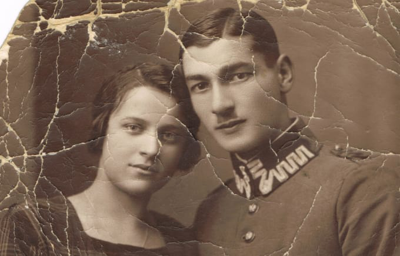
AI Restoration Prompt
Full transparency — this is the exact Gemini prompt we use to restore your photos:
“Restore this old photo into professional portrait of DLSR - quality colour and detail, using an advanced upscaling algorithm comparable to the results from canon EOS R6 II. Ensure the restored the image looks natural, retains exact facial features, has great clarity.”
Powered by Gemini AI (Nano Banana 2) — optimized for DSLR-quality photo restoration with natural facial feature preservation.
Why Choose Nano Banana for Photo Restoration?
Professional AI-powered photo restoration that brings old photos to life with stunning clarity and natural color.
DSLR-Quality Photo Restoration
Nano Banana restores old photos to professional DSLR-quality results comparable to a Canon EOS R6 II. Every detail is enhanced while keeping facial features and natural textures perfectly intact.
Powered by Gemini AI
Built on advanced Gemini AI technology, Nano Banana delivers state-of-the-art photo restoration. Our carefully crafted Gemini old photo restoration prompt ensures consistent, high-fidelity results every time.
Flexible Resolution Options
Choose from 1K, 2K, or 4K resolution to enhance old photos at the quality level you need. From quick previews to print-ready restorations, the right option is always available.
Batch Photo Restoration
Restore up to 5 old photos at once. Perfect for digitizing family albums or archiving vintage photo collections. Each image is processed individually with the same professional-grade restoration.
How to Restore Old Photos with AI
Three simple steps to bring old photos to life with Nano Banana's AI photo restoration.
Upload Your Old Photo
Drag and drop or click to upload your vintage, faded, or damaged photo. Supports JPEG, PNG, and WebP up to 30MB. Add up to 5 photos for batch restoration.
AI Restores Your Photo
Nano Banana's Gemini-powered AI analyzes your old photo and restores color, sharpness, and detail automatically using an advanced upscaling algorithm. No manual editing required.
Download the Restored Photo
Preview the before and after comparison, then download your beautifully restored photo. Batch processing? Download all restored photos at once.
Simple and transparent Nano Banana pricing
Choose the perfect plan for your AI image creation needs.
Cancel anytime
Starter
Save 30%Perfect for trying out AI image generation and small projects.
What's included
- 4200 AI generation credits per year
- Nano Banana models
- Nano Banana Pro models
- Seedream 4.5 models
- Veo 3.1 & Sora 2 & Wan 2.5/2.6 video generation models
- Flux Kontext models
- Up to 5 reference images upload
- Up to 2 batch generation tasks
- Nano Banana Pro up to 2K resolution
- 3x,4x image enhancement service
- Standard generation speed
- Standard success rate
- Standard customer support
- Commercial license
Perfect for experiencing AI image generation and editing effects.
Pro
Save 50%Ideal for creators, designers, and content professionals.
Everything in Starter
- 19200 AI generation credits per year
- Nano Banana models
- Nano Banana Pro models
- Seedream 4.5 models
- Veo 3.1 & Sora 2 & Wan 2.5/2.6 video generation models
- Unlimited Flux Kontext models
- Up to 10 reference images upload
- Up to 10 batch generation tasks
- Nano Banana Pro up to 4K resolution
- 3x,4x image enhancement service
- Priority processing speed
- High success rate
- High-speed download channel
- Priority customer support
- Unlimited commercial license
🔥 Limited Time Offer! Get Pro Now
Premium
Save 50%For teams, agencies, and high-volume commercial use.
Everything in Pro
- 66,000 credits / Year
- Nano Banana models
- Nano Banana Pro models
- Seedream 4.5 models
- Veo 3.1 & Sora 2 & Wan 2.5/2.6 video generation models
- Unlimited Flux Kontext models
- Up to 10 batch generation tasks
- Up to 10 reference images upload
- Nano Banana Pro up to 4K resolution
- 3x,4x image enhancement service
- Fastest generation speed
- Most advanced AI editing capabilities
- Permanent image storage
- Dedicated account manager
- Unlimited commercial license
Perfect for teams and businesses
For any questions about payment, contact our support team:Contact support
Pay safely and securely with









Photo Restoration FAQ
Everything you need to know about restoring old photos with Nano Banana.
How do I restore old photos with AI?
Simply upload your old, faded, or damaged photo to Nano Banana. Our AI analyzes the image and automatically restores color, sharpness, and detail to bring old photos to life. Choose your preferred resolution (1K, 2K, or 4K) and download the restored result in seconds.
What prompt does Nano Banana use for photo restoration?
We believe in full transparency. Nano Banana uses this exact Gemini old photo restoration prompt: "Restore this old photo into professional portrait of DLSR - quality colour and detail, using an advanced upscaling algorithm comparable to the results from canon EOS R6 II. Ensure the restored the image looks natural, retains exact facial features, has great clarity." This prompt has been carefully optimized to produce consistent, high-quality results.
Is Nano Banana photo restoration free to use?
New users get 20 free credits to try our AI photo restorer. Credits per restoration depend on resolution: 1K costs 8 credits, 2K costs 12 credits, and 4K costs 14 credits. You can also earn free credits through daily check-ins.
Can I restore multiple old photos at once?
Yes! Nano Banana supports batch photo restoration for up to 5 images at once. Free users can restore 1 photo at a time, while Pro and Premium subscribers can process up to 5 photos simultaneously.
What resolution should I choose to enhance old photos?
Choose 1K for quick previews, 2K for a great balance of quality and speed, or 4K for the highest detail suitable for printing. Higher resolutions produce sharper results but use more credits.
How does Gemini AI improve photo restoration quality?
Nano Banana is powered by the Gemini AI model (Nano Banana 2), which excels at understanding image context, restoring natural skin tones, recovering lost detail, and producing DSLR-quality output. The advanced upscaling algorithm ensures restored photos look natural rather than artificially enhanced.
What types of old photos can be restored?
Our AI can enhance old photos of all kinds: faded family portraits, damaged vintage photographs, yellowed snapshots, low-resolution scans, and more. The AI preserves original facial features while dramatically improving color, clarity, and detail.
Can I use restored photos for commercial purposes?
Absolutely. All photos restored through Nano Banana are yours to use commercially, including for publications, marketing, websites, social media, and print. There are no usage restrictions on your restored images.
Explore more AI Tools
Switch tools without breaking your creative flow.

Image Upscaler
Enhance image resolution with AI-powered upscaling

AI Background Remover
Remove image backgrounds instantly with AI

Browser Extension
Integrate Nano Banana capabilities into your browser
AI Unblur Image
Sharpen blurry photos and reduce motion blur with AI
Bring one more photograph back to life
Repair fading, scratches, blur, and age-worn detail while preserving the faces and character that make the original worth keeping.