

If you are choosing between GPT Image 2.5 Flare and Sunburst, start with the job. Flare is OpenAI's speed-focused choice for everyday image generation; Sunburst is its more capable choice when fine detail and controlled edits matter. Both can generate, edit, and create transparent-background images. The most useful decision is whether a faster image already meets your acceptance criteria, not whether one model wins every prompt. This guide gives you a comparison you can run on your own work; the workflow illustration below is conceptual, not a model-output test.
Flare vs Sunburst at a glance
| Decision point | GPT Image 2.5 Flare | GPT Image 2.5 Sunburst |
|---|---|---|
| OpenAI's positioning | Fast, high-quality everyday generation | Most capable generation and editing; greater precision for demanding work |
| Good first test | Social concepts, thumbnail directions, product-idea drafts, many prompt iterations | Final campaign visuals, detailed product imagery, edits where small changes must be controlled |
| Generation and editing | Both supported | Both supported |
| Transparent background | Supported with PNG or WebP output | Supported with PNG or WebP output |
| API model ID | gpt-image-2.5-flare | gpt-image-2.5-sunburst |
| API token rates | Same published rates as Sunburst | Same published rates as Flare |
OpenAI introduced both API models on September 8, 2026. Its launch announcement says Flare is its default for most applications and reports 50% lower latency than GPT Image 2, the previous model. That figure is a supplier comparison with GPT Image 2, not a measured Flare-versus-Sunburst speed gap. Sunburst is described as taking longer for an extra level of control. Actual timings depend on prompts, references, dimensions, and quality settings.
Which model should you choose for your task?
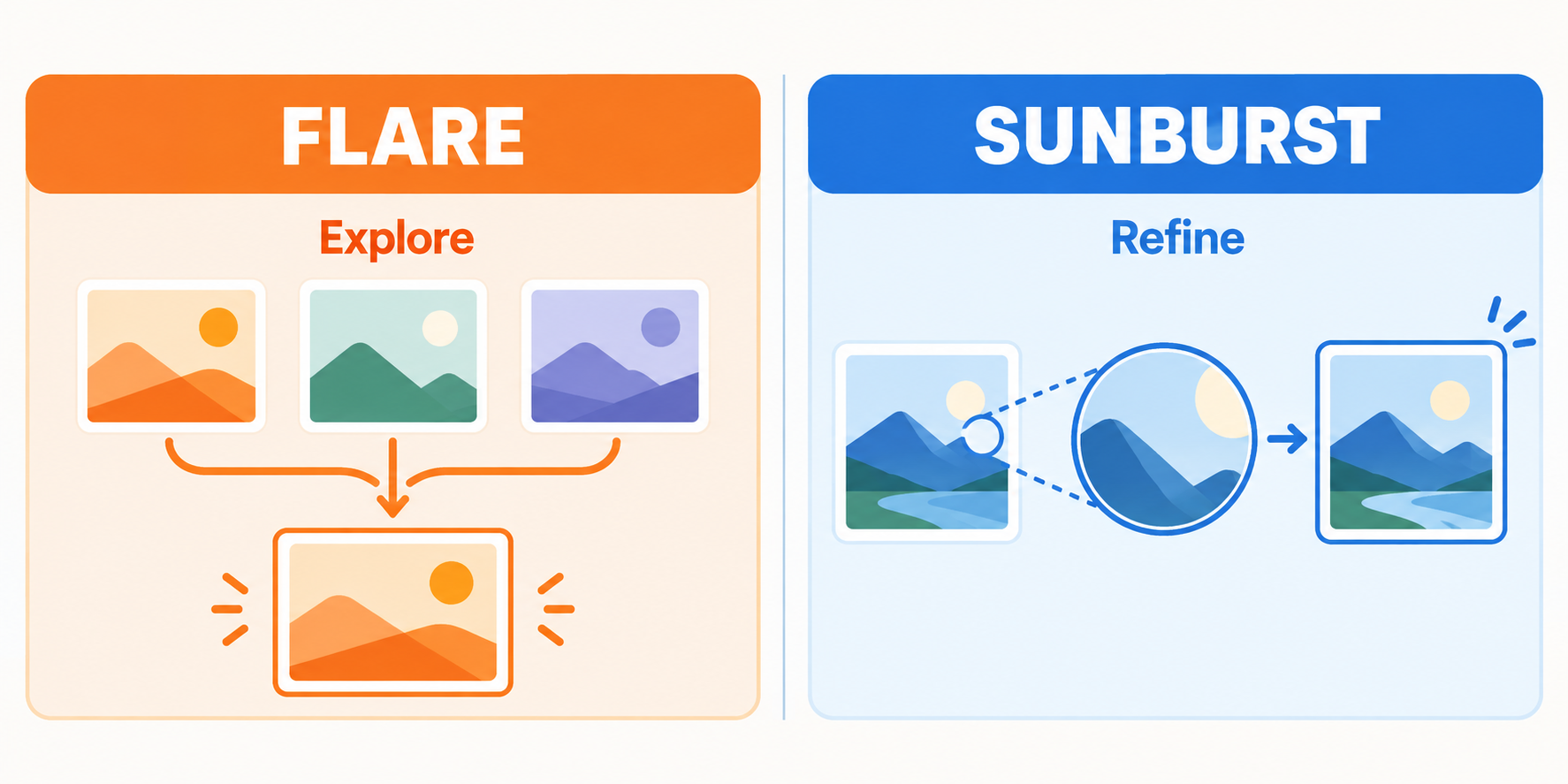
Conceptual illustration made for this guide. It explains a useful workflow; the thumbnails are not Flare or Sunburst test outputs.
Choose Flare first when the next useful step is to see several directions quickly. A creator planning a product launch might need a range of compositions before anyone knows which image deserves detailed review. Faster iteration can matter more than polishing the first candidate.
Choose Sunburst first when the image has specific details that must survive review: a recognizable product shape, an exact label, believable materials, or a local edit that should leave the rest of the scene intact. OpenAI positions Sunburst for precision editing and premium visual work. It is still worth checking the actual result closely; the model name alone does not guarantee perfect preservation.
A practical sequence is to explore with Flare, select a direction, and then try Sunburst for the demanding edit or final frame. But do not assume switching models automatically preserves the same pixels or composition. Save the approved reference image and restate what must remain unchanged.
How to compare Flare and Sunburst fairly
Run a small test on your own representative tasks. A single attractive sample cannot tell you how either model behaves across repeated edits.
- Pick two or three real tasks: for example, a product hero, a text-heavy poster, and a one-object edit. Define what counts as acceptable before generating.
- For each task, send the same prompt and reference image to both models. Keep size, quality, background, format, and number of outputs the same.
- Save several outputs per model. Judge instruction following, readable text, product or character consistency, unwanted changes, and whether the image is usable without manual repair.
- Record elapsed time and your cost per accepted image, including retries. The published API token rates are the same, but output token use can differ, so equal rates do not guarantee equal bills.
- If Flare passes your visual checklist, use it where the measured speed helps. If it misses a requirement that Sunburst consistently meets, use Sunburst for that task. Try changing one quality setting at a time before rewriting the prompt.
OpenAI's image prompting guide recommends this workload-based approach. It also warns that a higher quality setting does not improve every prompt. Testing xhigh or max only makes sense when they fix a specific unmet requirement within your time and cost budget.
Copyable prompt for a generation test
Create a landscape hero image for a reusable glass water bottle. Show one bottle on a pale stone surface, soft daylight from the left, and a clean area on the right for later page copy. Keep the bottle silhouette, cap color, and printed word “CLEAR” consistent. No other text, logos, hands, or extra bottles.
Use the same size and quality with Flare and Sunburst. Check the bottle geometry, the exact word, and the empty copy area. Change only the model for the first comparison.
Copyable prompt for a precise edit
Change only the bottle cap from silver to matte black. Keep the bottle shape, label text “CLEAR,” background, light direction, reflections, framing, and all other objects unchanged. Do not add text or props.
Feed the same approved source image to both models. Compare the cap change and inspect the rest of the frame at full size. For multi-step work, repeat preservation instructions each round; OpenAI notes that details can drift across repeated edits. If a region must remain pixel-identical, finish it by compositing the approved edit into the original image.
What do speed, quality settings, and price really mean?
The API offers auto, low, medium, high, xhigh, and max quality for both models. Both accept custom sizes within OpenAI's documented limits. A higher quality level can consume more time and image output tokens, yet may not solve your particular failure. Start with a practical setting, inspect the result, and change one variable at a time.
The two models currently have the same published per-token API rates. Your total cost also reflects text and image inputs, generated output tokens, and retries. Pricing on a third-party creation site can use a different credit system, so check the price shown where you actually generate.
For transparent assets, request a transparent background and export PNG or WebP; JPEG cannot preserve transparency. Inspect the alpha edges before using a cutout in a design. If the final image is too small for its placement, use an image upscaler after you have approved the composition rather than treating enlargement as a fix for incorrect content.
Where can you try the workflow?
The GPT Image 2.5 workspace on Nano Banana lets you choose Flare or Sunburst for text-to-image and reference-based editing. You can also explore gpt image 2.5 in a dedicated browser interface. For more starting concepts before the controlled comparison, browse prompt ideas and adapt one to your actual brief.
The short recommendation
Use Flare to explore quickly when many acceptable directions are possible. Use Sunburst when a demanding image or edit needs closer control. For the final choice, compare both with identical inputs and judge the result against a written checklist. That makes the decision repeatable and keeps official positioning separate from your own measured outcome.