

Nano Banana 2.1 is officially available. Google released the stable model on October 6, 2026, under the API ID gemini-nano-banana-2.1. It updates Nano Banana 2 with improvements to visual quality, instruction following, text rendering, and consistency across successive edits.
For creators, the useful question is how those changes affect everyday work: a product label that survives a background change, a poster with readable copy, or a wide banner that holds together at high resolution. For developers, there is also a migration deadline and a different cost structure to consider.
This guide covers the confirmed release, practical workflows, API pricing, and the settings to check before switching. Information was verified on October 7, 2026, against Google's Gemini API documentation and the official Google Cloud model page. Our earlier Nano Banana 2.1 preview records the signals before the launch.
What is Nano Banana 2.1?
Nano Banana 2.1 is Google's image generation and conversational editing model designed for efficient everyday creative work. You can start with a text description, provide reference material, and refine the result through follow-up instructions.
| Question | Confirmed answer |
|---|---|
| When did it launch? | October 6, 2026; generally available, or GA |
| Which model ID should developers use? | gemini-nano-banana-2.1 |
| What can it produce? | Images and text |
| Which image sizes are supported? | 1K, 2K, and 4K; default 1K |
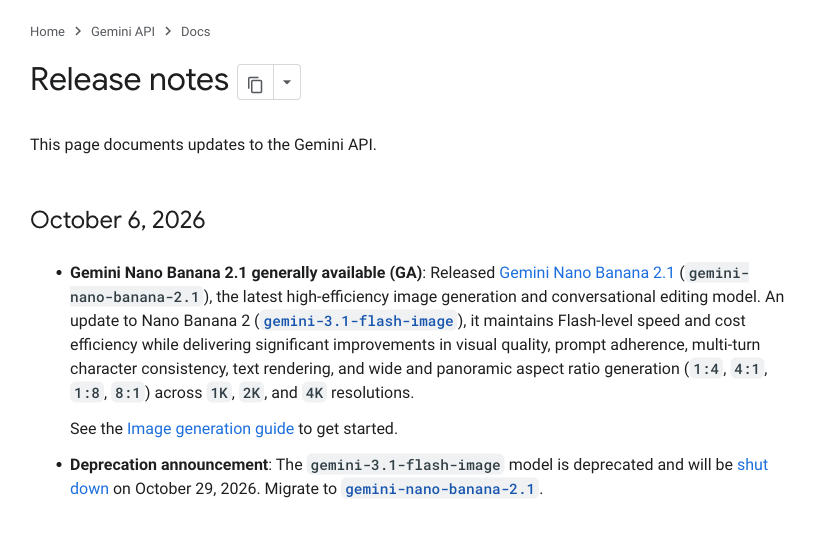
Source: Google AI for Developers, Gemini API release notes, October 6, 2026. Screenshot captured October 7. The same announcement identifies the new model and the old model's retirement schedule.
What actually improves over Nano Banana 2?
Google's release notes describe improvements in quality and reliability while retaining the Flash-oriented positioning. That matters more than a longer list of output formats: 4K generation and multiple references already existed in Nano Banana 2.
More faithful visual details and instructions
The official update emphasizes better realism and closer adherence to prompts. Product photography is a useful place to evaluate this: ask for a specific camera angle, lighting direction, and material, then check whether the result respects all three.
For a glass bottle, inspect the reflections and the shape of its base. For fabric, inspect seams and the direction of the weave. A visually attractive image still needs those details to make sense when it becomes a catalog asset.
Better text and infographic layouts
Google highlights improvements to text rendering and infographic layout. These are relevant to promotional posters, menus, packaging concepts, and information cards where the words carry the message.
Give the model the exact copy, its placement, and a hierarchy. “Make an attractive sale poster” leaves room for invented wording; “put SUMMER DROP at the top, with 20% OFF directly underneath” gives you a result you can check. Proofread the final image, especially small text and prices.
More consistent subjects through successive edits
The release also targets multi-turn character consistency. The model documentation describes up to 14 reference images, with support for maintaining up to four characters and fidelity for up to ten objects. Treat those as documented capabilities, rather than a promise that every crowded composition will succeed.
In practice, assign a role to each reference and make one major change at a time. Preserve the product first, change the environment second, and adjust a small detail last. If a label or face drifts, return to the approved image and restate the features to preserve.
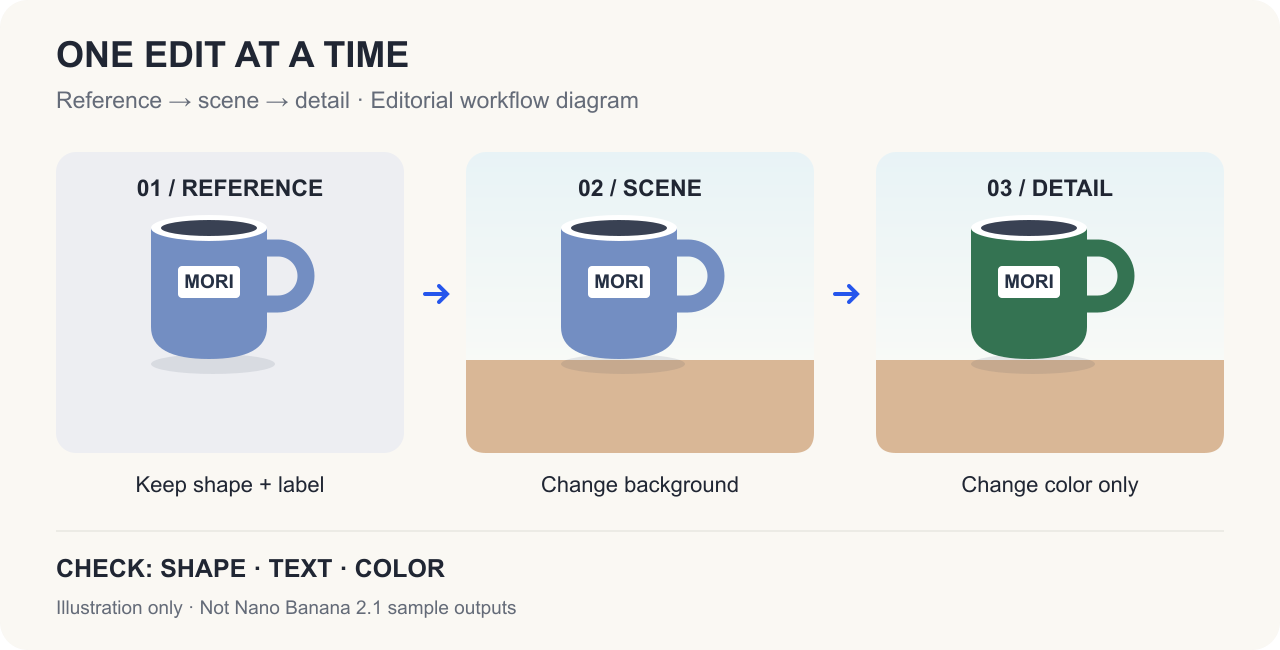
Editorial workflow diagram. It illustrates an editing sequence and inspection points; the panels are not Nano Banana 2.1 sample outputs.
More reliable wide and panoramic compositions
The model page specifically reports a fix for tiling artifacts at 2K and 4K in the wide or tall ratios 1:4, 4:1, 1:8, and 8:1. This is particularly relevant to website banners, elongated display graphics, and tall campaign artwork.
Start by defining where the subject, headline, and empty space should sit. Then inspect the full width for repeated objects, visible joins, and inconsistent lighting. A conventional 16:9 crop may hide problems that become obvious in a much wider export.
Sources: Google Gemini API release notes and Nano Banana 2.1 model documentation, October 6, 2026. The inspection advice above is an editorial workflow recommendation.
How much does Nano Banana 2.1 cost?
The following are Gemini Developer API image-output prices in USD, checked on October 7, 2026. They are not subscription prices or the complete cost of a request.
| Output resolution | Nano Banana 2.1 Standard | Nano Banana 2.1 Batch | Previous Nano Banana 2 Standard |
|---|---|---|---|
| 1K | $0.0336 | $0.0168 | $0.067 |
| 2K | $0.0504 | $0.0252 | $0.101 |
| 4K | $0.0756 | $0.0378 | $0.151 |
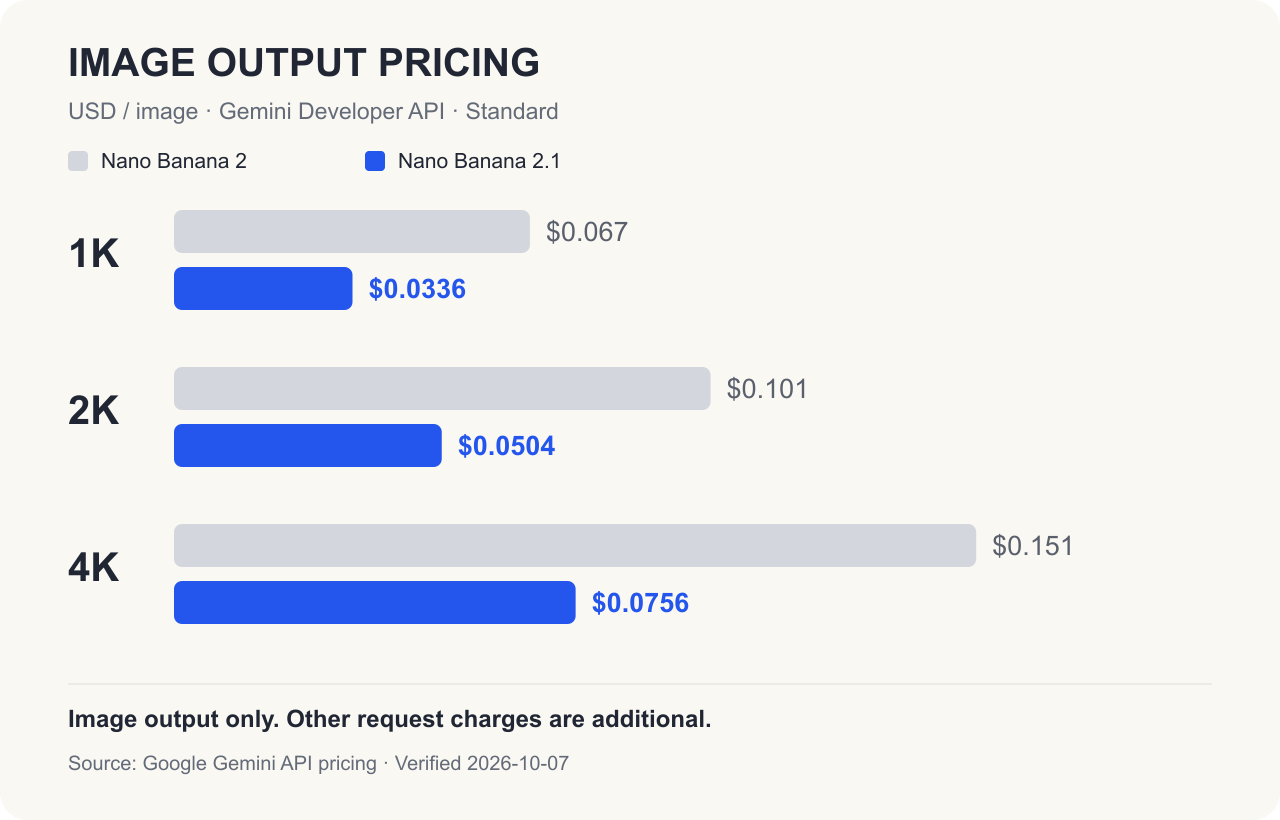
Source: Google Gemini API pricing, checked October 7, 2026. Bars show image output only. Input, text and thinking output, and any billable search queries are additional.
The Standard image-output component is approximately half the previous model's price. The total request is not automatically half the price. Nano Banana 2.1's Standard input rate is $1.50 per million tokens, while text and thinking output costs $7.50 per million tokens. Those rates are higher than the previous model's $0.50 and $3, respectively.
For example, 100 images at 2K would have an image-output component of $5.04 with Standard or $2.52 with Batch. Add the other applicable charges when estimating a project. Batch is useful for queued work that does not need an immediate interactive response.
A practical workflow is to settle the composition at 1K, check layout and text at 2K, and request 4K when the final asset needs that detail. If you only need to enlarge an existing image, consider the image upscaler. For usage on this site, consult our plans and credits; Google's API rates and website plans are separate products.
Should you choose 2.1, Lite, or Pro?
Google's current image generation guide positions 2.1 as the main efficient model, Lite for speed and scale, and Pro for demanding creative work. Use that positioning to choose a starting point, then compare the same brief with your own references.
| Your task | A useful starting point |
|---|---|
| Product scenes, posters, several references, and repeated refinements | Nano Banana 2.1 |
| Simple, rapid drafts with little dependence on reference continuity | Nano Banana 2 Lite |
| A demanding composition where you want another premium-model candidate | Nano Banana Pro |
For a fair comparison, keep the prompt, references, and output size constant. Count how many usable results you get and how many corrections each needs. That is more useful for a real project than choosing from one impressive sample.
The Nano Banana 2 versus Lite comparison explains their earlier trade-offs; Google's current guidance recommends 2.1 for new projects that would previously have used Nano Banana 2.
How can you try it, and what should developers check?
Google's documentation provides access through Google AI Studio and the Gemini API, as well as a separate Google Cloud model entry. In a model selector or request, look for gemini-nano-banana-2.1. Choose your aspect ratio and one of the supported output resolutions before testing a short, precise brief.
Two additional controls are useful for more involved briefs: Google Web and Image Search grounding can provide reference context, and the model supports minimal, medium (default), and high thinking levels. Consider higher thinking for a complex layout, then compare the result and cost. Search context helps with research; verify any factual claims before publishing an infographic.
For existing Gemini API integrations, Google's release notes announce retirement of gemini-3.1-flash-image, and the deprecation schedule lists October 29, 2026. Plan the migration before that date and follow any updated retirement notices.
Check three things when switching:
- Resolution: 2.1 supports 1K, 2K, and 4K. The older model's 512px/0.5K setting is not supported.
- Request parameters: the Google Cloud page says
seed,temperature,topP,topK, andlogprobsare unsupported and cause an error if supplied. Remove inherited sampling settings when adapting a Cloud request. - API surface: the Gemini Developer API guide shows Interactions API examples, while the Cloud model page lists Interactions API as unsupported. Use the examples for your chosen platform rather than copying a request between them unchanged.
If you are new to image editing, our Nano Banana beginner's guide explains how to prepare a reference and describe a change. You can also follow the Nano Banana 2.1 page for updates to our creative workflow.
You can also explore image generation and editing ideas on the Nano banana 2.1 website.
Three prompts to make the first session useful
These are starting briefs you can adapt to your own assets. They are not claims of measured performance.
1. A product poster with exact copy
Upload a clear product reference and ask for a layout with a short headline:
Create a 4:5 product launch poster using the uploaded reference.
Keep the product shape, logo, label, and colors faithful to the reference.
Use a warm ivory background and soft light from the upper left.
Place the exact headline "SUMMER DROP" at the top.
Place "20% OFF" directly below it in smaller type.
Add no other words. Keep generous space around the product.
Check the two phrases letter by letter, then compare the product's outline and label with the reference. If an unwanted background makes the reference difficult to read, remove the background before starting.
2. A background change followed by one local edit
Keep the conversation and the approved image as context. Start with:
Place the referenced ceramic mug on a pale wooden desk beside a window.
Keep its shape, handle, printed logo, and glaze color unchanged.
Use natural morning light and a realistic contact shadow.
Do not add text or extra products.
Then make one isolated change:
Using the previous image, change only the mug's glaze color to forest green.
Keep the handle, logo, desk, camera angle, lighting, and shadows unchanged.
Compare the approved image with the revision. If the logo or handle changed, use the approved image again and make the preservation instruction more explicit.
3. A wide banner with room for a headline
Choose 4:1 in the output settings and test the layout before requesting the final size:
Create a panoramic mountain-lake campaign image.
Place a small yellow tent in the right third.
Keep the left half quiet, with soft sky and distant mountains,
so a headline can be added later. Render no text.
Use one coherent landscape with consistent daylight.
Do not repeat the tent, trees, or mountain peaks as a pattern.
Inspect the full image, including both edges, before exporting a 2K or 4K final. The prompt library offers more structures to adapt once you know which part of your brief needs refinement.
Questions users are asking
Is Nano Banana 2.1 free?
The Gemini Developer API pricing table lists no free tier for this model. Consumer-app allowances, AI Studio access, and third-party plans have their own conditions; check the product you intend to use.
Is 4K a new feature in 2.1?
No. Nano Banana 2 already supported 4K. This release emphasizes quality, consistency, text, and panoramic reliability, alongside lower image-output pricing.
Can it generate videos?
Its output modalities are image and text. Video can be an input for tasks such as designing a thumbnail or a summary graphic; video input does not make it a video-output model.
Are generated images marked as AI content?
Google's image generation guide says generated images include SynthID. The Cloud model page also lists C2PA Content Credentials support. These are provenance features; they do not mean that every exported image displays a visible badge.
Will it always beat Pro or finish in a fixed number of seconds?
Google describes improvements over Nano Banana 2 and retains the Flash-oriented positioning. That does not establish a universal win over Pro or a guaranteed runtime for every request. Test the resolution, references, and editing steps your project actually uses.
Start with one asset you already understand: a product photo, a short poster, or a banner brief. Check the first result, make one targeted revision, and keep the approved image as your next reference. That gives you a useful basis for deciding where Nano Banana 2.1 fits in your workflow.