Nano Banana 2 vs Nano Banana 2 Lite: What's the Difference and Which One Should You Use?

If you only want the short answer, this is it:
- Choose Nano Banana 2 if you care more about higher output ceilings, broader editing capability, and better fit for production-ready assets.
- Choose Nano Banana 2 Lite if you care more about speed, lower cost, and high-volume drafting at 1K resolution.
That sounds simple, but the real confusion starts when product pages, model docs, and marketing language use overlapping claims like "fast," "high quality," and "up to 4K." If you are trying to decide which one fits your workflow, the more useful question is not "Which one is better?" It is "Which one is better for the way I actually work?"
This guide breaks down the real differences between Nano Banana 2 and Nano Banana 2 Lite, explains where the marketing copy is clear versus where it is inconsistent, and helps you choose the right model for concepting, social content, editing, product mockups, and production-ready image work.
What Nano Banana 2 and Nano Banana 2 Lite Actually Are
At the product level, Nano Banana positions both models as part of the same family:
- Nano Banana 2 is the more capable general-purpose model for image generation and editing.
- Nano Banana 2 Lite is the speed-first and cost-first version designed for rapid iteration.
Under the hood, Nano Banana maps these products to Google's Gemini image model family:
- Nano Banana 2 corresponds to Gemini 3.1 Flash Image.
- Nano Banana 2 Lite corresponds to Gemini 3.1 Flash Lite Image.
That distinction matters because Google's documentation is much more precise than typical landing page copy. Google's model docs describe Nano Banana 2 as the "generalist workhorse" and Nano Banana 2 Lite as the "efficiency specialist" built for ultra-low latency and lower-cost generation. Those two descriptions line up with the real practical difference between them.
The Fastest Way to Understand the Difference
The easiest way to think about the split is this:
| Category | Nano Banana 2 | Nano Banana 2 Lite |
|---|---|---|
| Core role | General-purpose image generation and editing | Speed-first drafting and iteration |
| Underlying model | Gemini 3.1 Flash Image | Gemini 3.1 Flash Lite Image |
| Best for | Production work, stronger editing, broader output needs | Quick drafts, high throughput, lower-cost experimentation |
| Resolution support | 0.5K, 1K, 2K, and 4K | 1K only |
| Latency positioning | Low-latency mainstream workhorse | Ultra-low-latency specialist |
| Reference workflow | Better fit for stronger multi-reference and broader creative tasks | Up to 10 references, but optimized for fast 1K iteration |
| Best buyer mindset | "I need a reliable all-around model." | "I need speed and cost efficiency first." |
For most users, that table is the answer. The rest of the article explains why.
Google’s Official Positioning Makes the Split Clear
Google's June 30, 2026 product announcement introduced Nano Banana 2 Lite as its fastest and most cost-efficient Gemini image model, built for high-throughput, speed, and scale. In the same post, Google described the family like this:
- Nano Banana 2 Lite is built for speed.
- Nano Banana 2 is the generalist workhorse.
- Nano Banana Pro is for more complex professional use cases.
That is one of the most useful framing devices because it moves the comparison away from hype and toward workflow fit.
The official Google docs add sharper technical details:
- Nano Banana 2 Lite targets sub-2 second end-to-end latency and is optimized for 1K output only.
- Nano Banana 2 supports 0.5K, 2K, and 4K output options, with 1K as the default.
That single difference already answers a lot of buying questions. If your workflow ends at fast ideation, Lite makes sense. If your workflow needs higher-resolution final assets, Nano Banana 2 immediately becomes the safer choice.
The Biggest Difference Is Not Just Speed. It Is Output Ceiling.
Many readers assume Lite simply means "slightly lower quality." That is not the most practical way to look at it.
The more meaningful difference is output ceiling.
Nano Banana 2 Lite is designed to get you to a good working image quickly and cheaply. It is ideal when:
- you are testing many prompt directions
- you need fast image-to-image revisions
- you are producing thumbnails, social drafts, or early mockups
- you care more about throughput than maximum finishing quality
Nano Banana 2 is better when you expect the image to survive deeper review. It is the stronger option when:
- you need 2K or 4K deliverables
- you want a more reliable production model for commercial assets
- text rendering quality matters in product mockups or diagrams
- you are moving beyond ideation into final-output territory
This is why "Lite vs full" is not really the right mental model. The more accurate comparison is "drafting engine vs mainstream workhorse."
The Resolution Story: One Part Clear, One Part Confusing
This is the section most users actually need, because the public messaging is not perfectly consistent.
According to Google's official Gemini API documentation:
- Nano Banana 2 Lite supports
1024pxonly, which is 1K. - 2K and 4K are explicitly unsupported for Lite.
- Nano Banana 2 supports 0.5K, 1K, 2K, and 4K options.
That is the clean technical answer.
However, the Nano Banana 2 Lite product page includes a "4K Ultra Resolution" feature block near the top. Later on the same page, the FAQ says the opposite: Nano Banana 2 Lite produces 1K images and users should switch to Nano Banana 2 or Pro for 2K or 4K output.
That means the Lite landing page contains an internal contradiction.
For practical decision-making, the safer interpretation is:
- trust the FAQ on the Nano Banana 2 Lite page
- trust the Google model documentation
- treat the "4K Ultra Resolution" feature block on the Lite page as marketing copy that does not match the actual model limits
If you specifically need 2K or 4K output, you should assume Nano Banana 2 Lite is not the right choice.
Nano Banana 2 Lite Wins on Speed and Cost
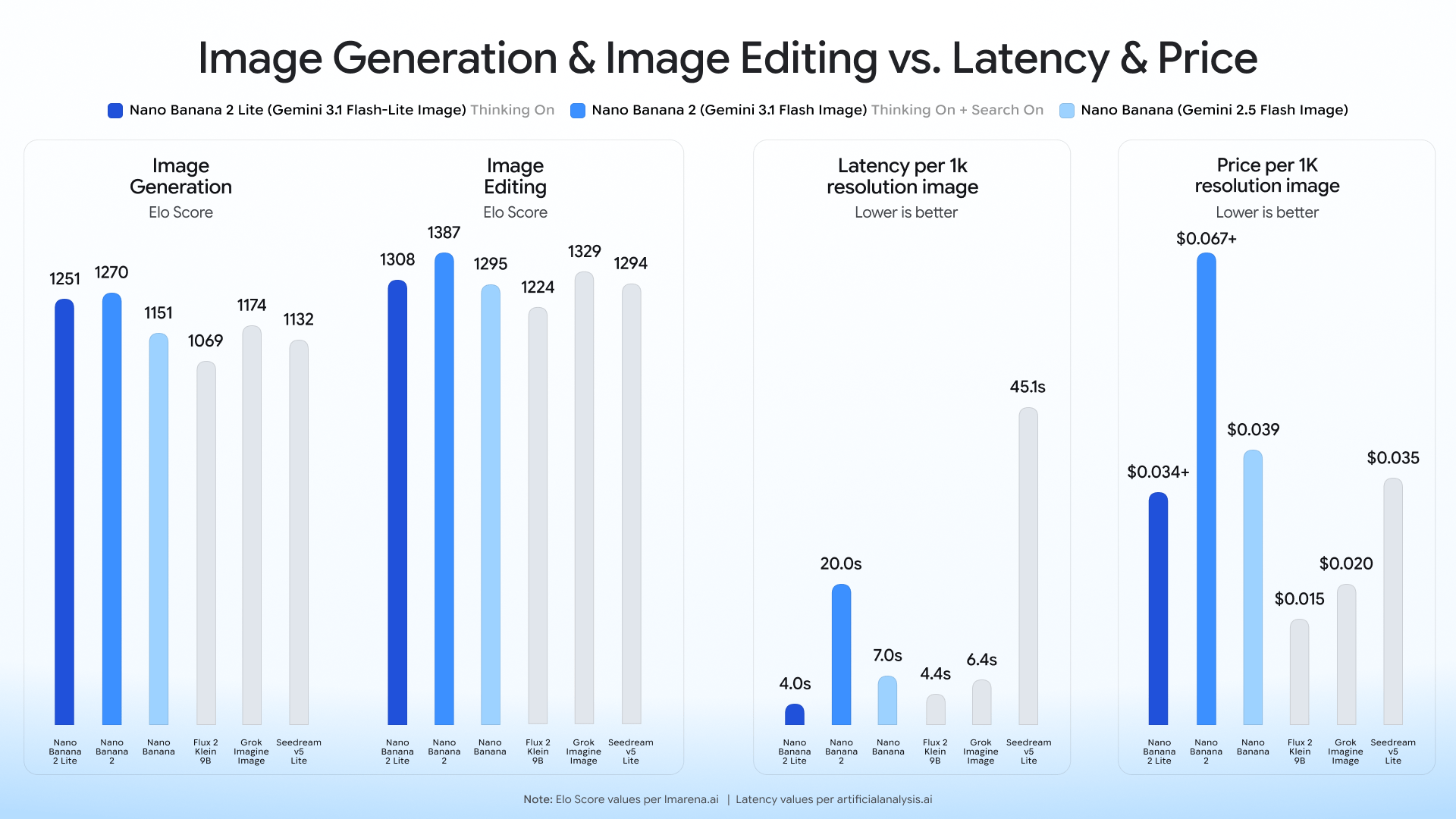
Google's official launch post gives the clearest case for Lite:
- text-to-image outputs in about 4 seconds
- cost of $0.034 per 1K image
- positioned for interactive prototyping and rapid visual drafting
That is not a minor optimization. It changes what kind of workflow the model enables.
If your team is generating dozens or hundreds of early-stage visuals, Lite lets you explore more directions before committing to a final style. That matters for:
- ad concept boards
- first-pass social creative
- ecommerce concept testing
- thumbnail exploration
- quick storyboard blocks
- "show me 10 angles fast" workflows
In those situations, Lite is not the weaker option. It is the more rational option.
The mistake is using Nano Banana 2 Lite for a job that is no longer about exploration.
Nano Banana 2 Wins When the Image Needs to Hold Up Under Review
Nano Banana 2 is better thought of as the more complete production model.
The official Nano Banana 2 page emphasizes:
- strong text rendering
- native 2K workflow in the product interface
- up to 4K output
- support for 100+ languages
- editing and enhancement for design, marketing, product, and infographic use cases
Google's Gemini 3.1 Flash Image documentation adds the technical side:
- support for multiple output resolution options
- improved image quality and consistency
- improved international text rendering
- broader aspect ratio support
- image search grounding for generation with real-time web data
That combination makes Nano Banana 2 the safer recommendation for:
- product visuals that need cleaner typography
- infographics or data-led visuals
- commercial graphics that may later be resized or printed
- polished hero images
- localization-heavy creative work
- image tasks where "good enough quickly" is not good enough
If Lite is your drafting layer, Nano Banana 2 is your finishing layer.
Reference Images and Editing: Both Can Edit, But Not For the Same Goal
One reason users get stuck is that both pages talk about editing.
Nano Banana 2 Lite supports prompt-based image editing and up to 10 reference images. That sounds powerful, and it is. But the context matters: the model is still optimized for fast 1K iteration.
Nano Banana 2 Lite makes sense for reference-driven work when you want to:
- restyle quickly
- test layout directions
- swap objects or backgrounds
- iterate on composition without waiting on a heavier pipeline
Nano Banana 2 is the better choice when reference-driven work needs stronger final quality, broader output flexibility, or more confidence that the result is ready for real delivery rather than further roughing-out.
This is why Lite can absolutely be a real editing model, but it is still not the model most users should choose for higher-stakes final commercial output.
So Which One Should You Use?
Choose Nano Banana 2 Lite if:
- your first goal is speed
- you generate large numbers of drafts
- your final output does not need more than 1K
- you are cost-sensitive
- you want an always-ready model for quick iterations and concept exploration
- your workflow is "test more directions faster"
Choose Nano Banana 2 if:
- you need 2K or 4K output
- you want one model that can stay useful from draft to production
- text rendering quality matters
- you are creating product mockups, diagrams, posters, or polished marketing assets
- you expect to reuse the image in commercial or client-facing contexts
- your workflow is "ship higher-quality work with fewer compromises"
A Good Real-World Workflow Is Lite First, Nano Banana 2 Second
For many teams, the best answer is not choosing one forever.
A practical stack looks like this:
- Use Nano Banana 2 Lite to explore prompts, references, and directions quickly.
- Pick the strongest concept.
- Move that concept into Nano Banana 2 when you need better finishing quality, stronger text rendering, or higher output resolution.
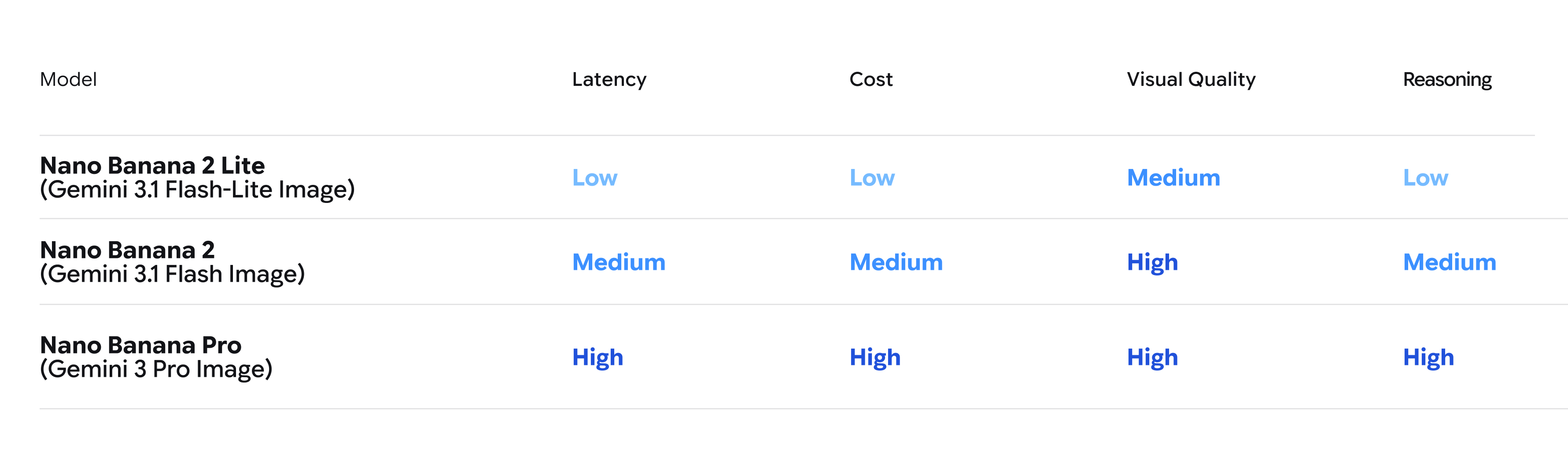
That workflow matches Google's own family positioning. Lite is for throughput. Nano Banana 2 is for balance. Pro is for the most demanding precision work.
For many creators, that is better than forcing one model to do every job.
Common Questions Users Usually Have
Is Nano Banana 2 Lite just a worse version of Nano Banana 2?
No. It is a more specialized version. Lite is designed to optimize for speed and cost, not to replace the broader role of Nano Banana 2.
Is Nano Banana 2 always better because it supports higher resolution?
Not always. If your job is ideation, high-volume testing, or quick social drafts, Lite may actually be the better fit because it gets you results faster and more cheaply.
Is the Lite page wrong about 4K?
The safest conclusion is that the Lite landing page contains a conflicting claim. The same page's FAQ says Lite is 1K only, and Google's official documentation also says Lite only supports 1K. If resolution is critical, follow the FAQ and the Google docs, not the isolated 4K feature block.
Can Nano Banana 2 Lite still do serious editing?
Yes, especially for practical prompt-based edits and fast reference-driven revisions. But if the image is meant to become a polished deliverable, Nano Banana 2 is usually the safer choice.
What if I do not know yet whether the image will stay a draft or become final?
Start with Lite if speed matters. Move to Nano Banana 2 when the image begins to matter enough that resolution, typography, consistency, or presentation quality become important.
Final Verdict
If your priority is rapid iteration, lower cost, and 1K drafting, Nano Banana 2 Lite is the right pick.
If your priority is stronger all-around capability, better production fit, and access to higher-resolution outputs, Nano Banana 2 is the better choice.
That is the real difference.
Nano Banana 2 Lite helps you move faster. Nano Banana 2 helps you finish stronger.