

For Nano Banana 2.1 vs Pro, start with 2.1 for most new image workflows. Its image-output price is lower, and Google's latest evaluations put it ahead of Pro on overall preference, infographic design, and several editing tasks. Keep Pro for specific reference requirements, established prompts, or jobs where your own acceptance checks show an advantage.
For everyday posters, product backgrounds, and repeated composition changes, try 2.1 first. For five-person consistency or dedicated style references, consider Pro. An accepted 2.1 image can be your final asset; a final-delivery label alone is no reason to regenerate it.
This comparison uses official documentation, model cards, pricing, and public examples checked on October 9, 2026. Google supplied the showcase images; we have not run an independent generation benchmark of the two models. For the release overview, see our Nano Banana 2.1 features and usage guide.
Nano Banana 2.1 vs Pro: the differences that affect your choice
Nano Banana 2.1 updates Nano Banana 2 and uses the API ID gemini-nano-banana-2.1. Nano Banana Pro is gemini-3-pro-image. Speed measurements and output comparisons involving the older Nano Banana 2 do not automatically describe 2.1.
| Comparison | Nano Banana 2.1 | Nano Banana Pro | Practical effect |
|---|---|---|---|
| Output resolution | 1K, 2K, 4K | 1K, 2K, 4K | 4K is available on both |
| Official total reference limit | Up to 14 images | Up to 14 images | Equal totals do not mean equal reference roles |
| Reference categories | Up to 4 character and 10 object references | Up to 5 character, 6 object, and 3 style references | Consider Pro for five-person briefs or dedicated style references |
| Search grounding | Google Web and Image Search | Google Web Search | Consider 2.1's image search for real-world visual references |
| Thinking settings | minimal, medium, high; medium by default | Thinking supported; settings depend on the interface | Record the actual settings when timing a job |
| Standard API 2K image output | $0.0504/image | $0.134/image | About 62.4% lower for 2.1 on this charge |
Sources: Google AI for Developers model pages, image-generation guide, and pricing; checked October 9, 2026. Reference categories describe the documented allocation within the total limit, not a guarantee of fidelity. A website may expose fewer uploads or options.
Here, Pro names the image model, rather than a website's Pro subscription or a chat mode. Confirm the selected image model in the interface. Our Nano Banana 2.1 workspace and Nano Banana Pro workspace provide the corresponding creation entry points.
Image quality, text, and editing: does 2.1 beat Pro?
Google's evaluations support trying 2.1 first
Google DeepMind's October model card evaluates 2.1 alongside the older Nano Banana 2 and Pro. These results are particularly relevant to posters, products, and recurring characters:
| Official evaluation | 2.1, Thinking | Pro |
|---|---|---|
| Overall text-to-image preference | 1050 ± 14 | 935 ± 8 |
| Infographic design | 1048 ± 17 | 912 ± 12 |
| Multi-character consistency | 1106 ± 14 | 1011 ± 10 |
| Mask/ink-based editing | 1049 ± 15 | 927 ± 12 |
| Product consistency | 1024 ± 18 | 965 ± 14 |
Source: Google DeepMind, Nano Banana 2.1 model card, October 2026. These are Google's evaluations, using the 2.1 Thinking column. The figures are preference Elo scores, with the reported intervals retained.
Elo describes relative preference within an evaluation, not accuracy. A score of 1050 versus 935 does not translate into a percentage improvement in image quality, and scores from different leaderboards are not interchangeable. These results change the default advice to reserve every difficult job for Pro. Your actual text, product fidelity, and editing constraints still need inspection.
Official design example: inspect the hierarchy as well as the words
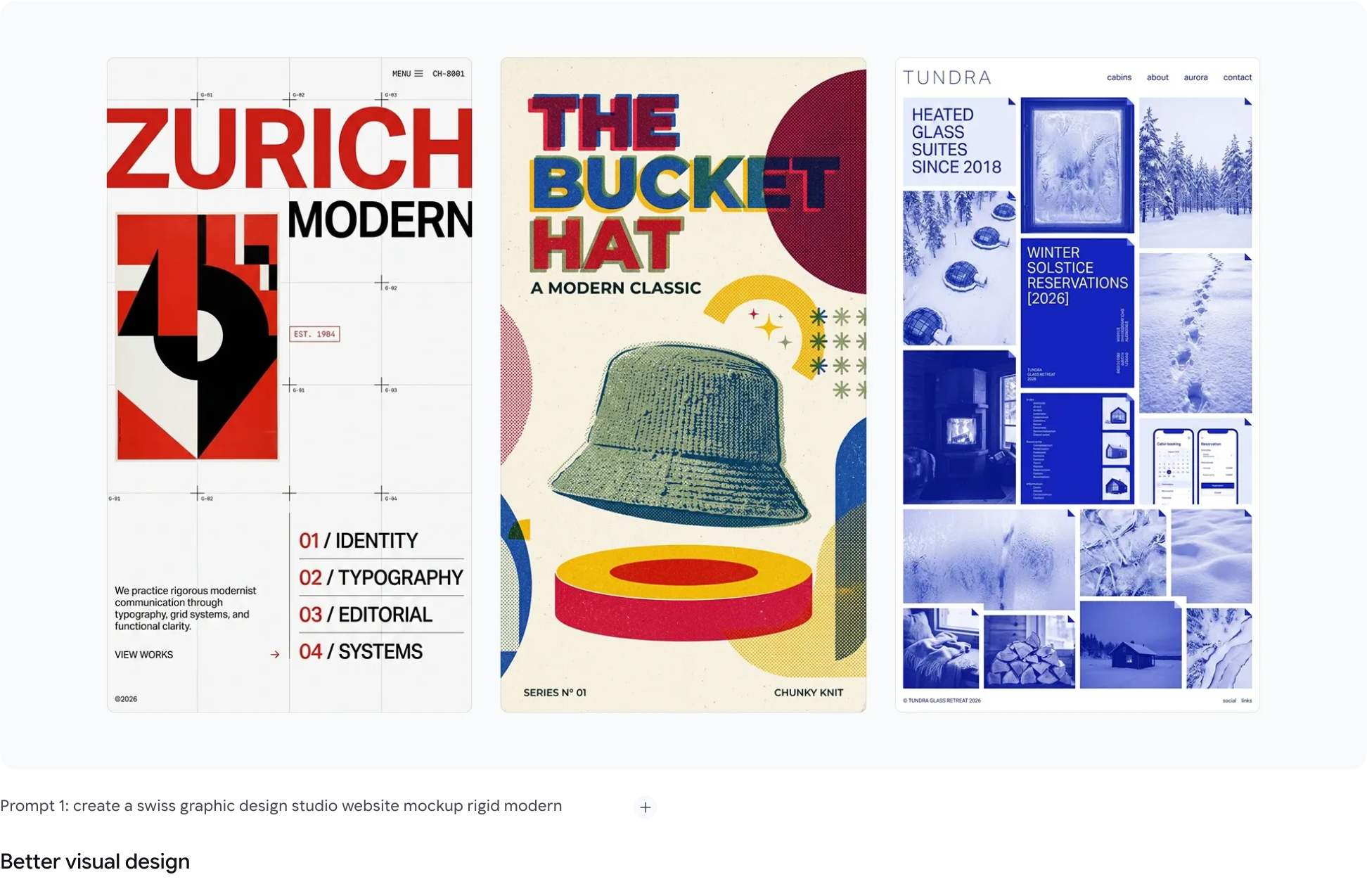
Source: Google DeepMind's design examples under “Introducing Nano Banana 2.1”; captured October 9, 2026. Official selected examples, not our test or a matched-prompt comparison with Pro.
The useful detail is the visual hierarchy across three layouts: whether large headings and small copy remain distinct, whether the subject hides essential text, and whether image density competes with the reading order. Treat the examples as design references, rather than a promise that every complex poster will succeed on the first attempt.
For a bilingual event poster, finalize each headline, date, and address before generation. Start at 2K and inspect small type at the intended display size. For exact terms, ingredient lists, or extensive prices, generate the background and add verified text in a layout editor. A 4K image can still contain the wrong date.
Official product example: preserve the product before judging the background
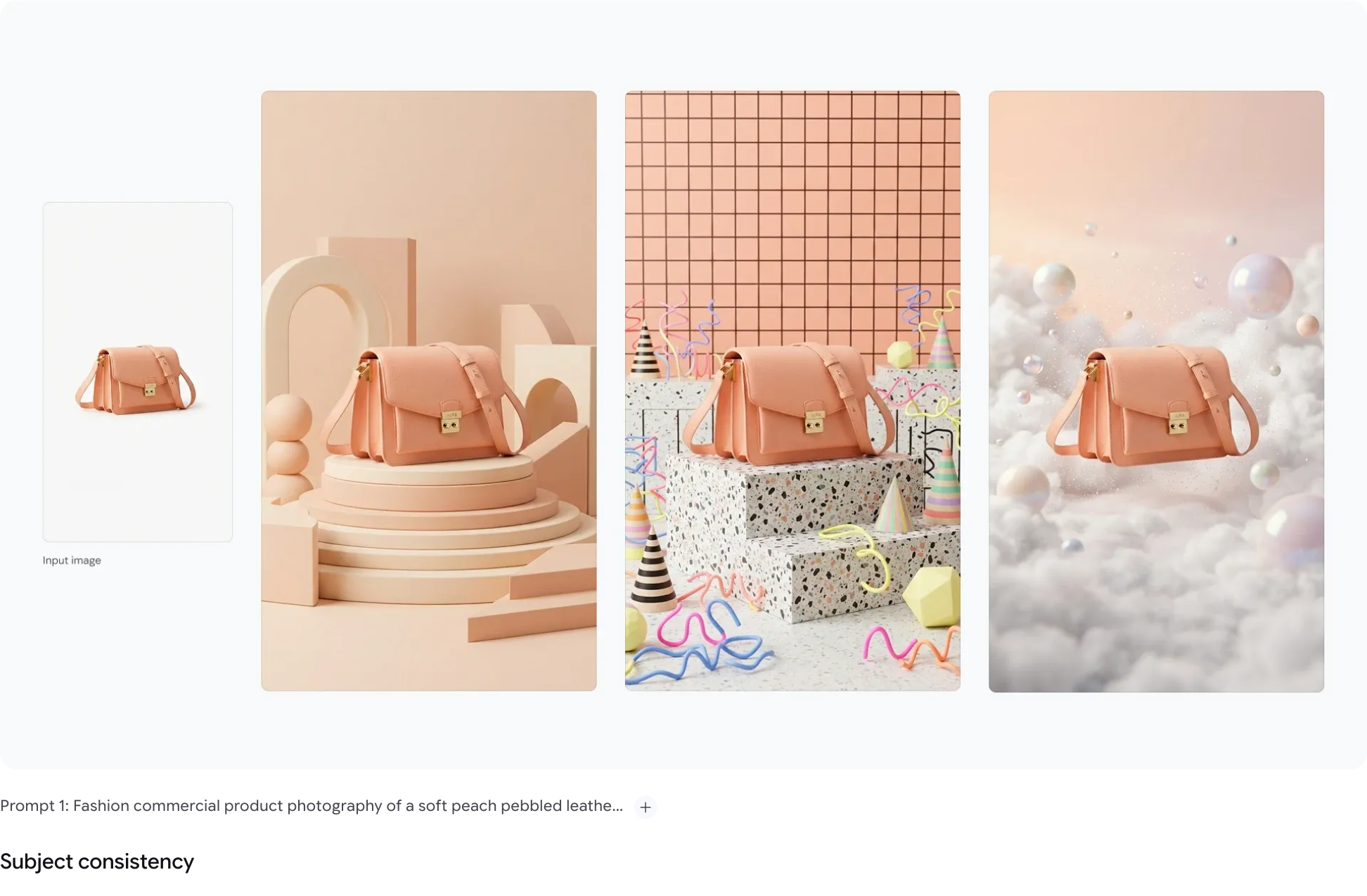
Source: Google DeepMind's Nano Banana 2.1 subject-consistency showcase; captured October 9, 2026. The panels show different product scenes, not a comparison of the two models.
Look beyond attractive lighting. Inspect the bag's proportions, clasp position, leather texture, and strap connections. For your own product, add the logo, label, and essential specifications to the checklist. A beautiful image with a different clasp fails a product brief.
Use a clear reference, change the background first, and handle a local color edit in a separate turn. To prepare a clean product reference, you can remove the image background, while retaining the original photograph for inspection.
The official editing results favor 2.1, but an instruction to change one area still needs checking. Compare the untouched region, subject pose, and any drawn marks against the input. The model card acknowledges remaining issues with small text, identity consistency, and ink-guided edits.
Speed: why can the newer model still make you wait?
Google positions 2.1 for Flash-level efficiency without publishing one universal generation time. Resolution, thinking settings, references, queues, and platform processing all affect the wait.
An original test posted by u/TimeCounty7878 in Reddit's r/reAPIOfficial summarizes its experience in the title:
“Cleaner text, but slower.”
The author reported cleaner 2.1 layouts in examples such as a menu, but longer waits than the older Nano Banana 2 under default settings. Each scenario used one run per model. The post notes that the earlier model defaulted to minimal thinking while 2.1 defaults to medium.
Source: Reddit, u/TimeCounty7878, r/reAPIOfficial; accessed October 9, 2026. The community is associated with an API service. This is a small platform-specific test against the older Nano Banana 2, rather than Pro.
The actionable lesson is to control the conditions. This post cannot establish that 2.1 is slower than Pro or predict your queue time. Compare minimal and medium when your platform exposes those settings; otherwise, record what you can select. Measure total time to an accepted image, including revisions and retries.
Pricing: how much cheaper is 2.1, and what is the real cost?
Compare the same official API tier
| Output size | 2.1 Standard | Pro Standard | Approximate reduction in image-output cost |
|---|---|---|---|
| 1K | $0.0336 | $0.134 | 74.9% |
| 2K | $0.0504 | $0.134 | 62.4% |
| 4K | About $0.113 | $0.24 | 52.9% |
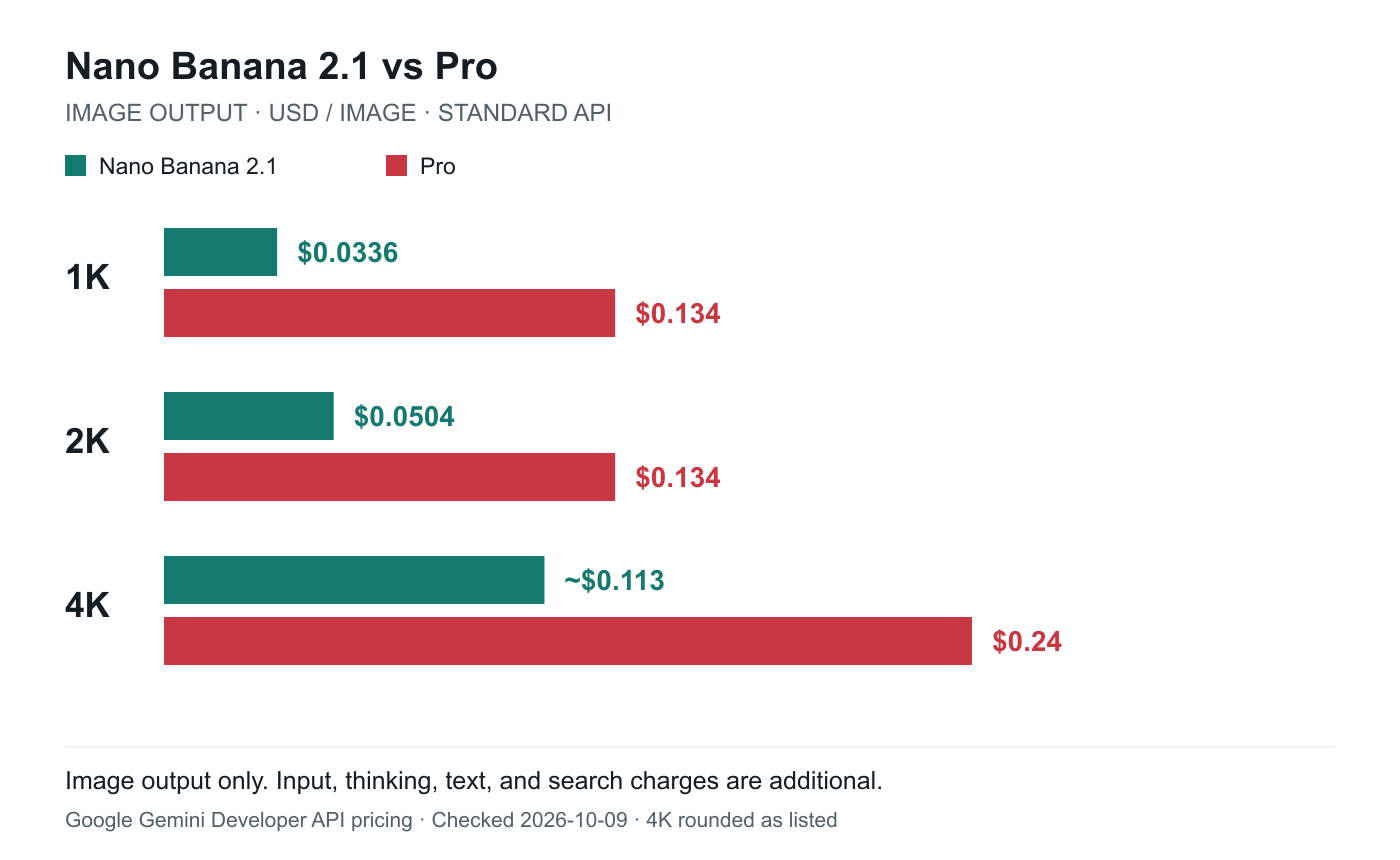
Data: Google Gemini Developer API pricing, October 9, 2026; chart by Nano Banana. Image output only, using the displayed rounded 4K price. Inputs, text and thinking outputs, and applicable search charges are additional.
For 100 generated 2K images, the image-output charge is $5.04 with 2.1 versus $13.40 with Pro. That is neither a complete request bill nor a website subscription quote. Google's current page lists 3,780 output tokens and approximately $0.113 for a 2.1 4K image; the $0.0756 figure in some launch-day articles is outdated for this comparison.
Both models also have Batch pricing for asynchronous API work. Compare Standard with Standard, or Batch with Batch. The pricing page lists no Gemini API free tier for either image model; consumer allowances and website credits are separate.
Website users should inspect credits and acceptance rates
On our website, use the credit charge displayed for your selected model and resolution. The pricing and credit plans explain subscriptions and top-ups. Google's image-output rate is not a website's final price.
For an actual task, calculate:
Generation cost per accepted image = total generation spend / accepted images
Here is a hypothetical example, not a measured acceptance rate. Generating 20 images at 2K costs $1.008 in 2.1 image output and $2.68 in Pro image output. If 10 and 15 images pass respectively, that becomes $0.1008 and about $0.1787 per accepted image. More accepted Pro outputs do not necessarily make it cheaper. If only four 2.1 outputs pass while 15 Pro outputs pass, the result reverses.
For commercial work, also record manual retouching time. Repeated logo corrections can outweigh a lower generation price. If the image is already correct and only its dimensions are insufficient, evaluate an image upscaler separately. Inspect the enlarged details; upscaling does not correct wrong content.
Run the same job on both: three copyable test prompts
These original templates are intended for your own comparison. Keep references, size, aspect ratio, and wording fixed; generate three outputs per model for each scenario and retain all results. This is a small screening exercise, rather than a statistical benchmark. Hide model names during review and apply criteria established before generation.
1. Bilingual poster: test text and layout
Use 2K at 4:5. The four lines below are the only permitted text:
Create a minimal coffee event poster. Portrait 4:5, white background,
dark green with red accents. Render exactly these four lines, with no other text:
秋日咖啡节
AUTUMN COFFEE FEST
10月18日 10:00–18:00
FREE ENTRY
Make the headline largest, the date clear, and all small text high contrast.
Include one white coffee cup without covering any text.
No watermark or extra logos.
Check every character, number, and punctuation mark, then inspect the cup overlap, reading order, and small type. An incorrect date fails the brief regardless of which model produced it.
2. Product edit: inspect what should stay unchanged
Upload the same product photograph that you have permission to use. Start at 2K, 1:1:
Preserve the reference product's shape, color, logo, label, materials,
and all connecting parts. Replace only the background with a light gray
photography studio and soft side lighting. Center the product while retaining
its original angle and size. No other products, added text, or watermark.
Save an accepted first result and continue in the same conversation or editing workflow:
Change only the background to dark green. Keep the product, logo, label,
angle, size, lighting, and shadows unchanged.
Compare the original, first edit, and second edit side by side. A changed product shape fails the second edit even if the background is correct. This is closer to a real ecommerce brief than judging one attractive image.
3. Characters and style: test whether Pro offers useful value
Start with the same four character references at 2K, 16:9:
Create a studio group photograph using the four people in the references.
From left to right, show reference images 1, 2, 3, and 4, each person once.
Preserve each person's facial features, hairstyle, and clothing colors.
White background, half-body framing, natural side lighting.
No extra people, text, or logos.
Check count, order, identities, and clothing. Then change the scene and inspect drift. For five people or dedicated style references, run a separate Pro test using its documented reference categories. Identify that as a different input configuration rather than mixing it into the four-person matched comparison.
For other scenarios, consult the image-generation and editing prompt library. Retaining your test results is often more useful than repeatedly replacing the prompt with a longer one.
When should you start with 2.1 or keep Pro?
| Your job | Starting point | When to change the model or method |
|---|---|---|
| Social images, routine posters, batches of creative directions | 2.1 | Try Pro if text or composition repeatedly fails |
| Several scenes featuring the same product | 2.1 | Reject altered logos, proportions, or structure on either model |
| Character series with up to four people | 2.1 | Keep Pro if the same references prove more consistent in your workflow |
| Five people or dedicated style references | Pro | Confirm that your platform supports the required categories and uploads |
| A stable existing Pro prompt workflow | Keep Pro, then compare a small 2.1 batch | Migrate after acceptance checks show a cost or time benefit |
| Long copy, exact tables, or essential factual data | Generate the background, then typeset and verify | Higher resolution does not replace text or fact checking |
Can Nano Banana 2.1 fully replace Pro?
It is a sensible default candidate for most new tasks, without a guarantee that it wins on every prompt. Keep Pro workflows with a clear purpose and decide from your own acceptance results.
Is Pro always better for Chinese text?
The available evidence does not support that claim across all Chinese-language tasks. Text and layout are highlighted improvements in 2.1; dense small type still requires inspection. Test the bilingual poster template with your actual copy.
Must the final image be regenerated with Pro?
No. A different model can change the subject, typography, or materials. Retain an accepted 2.1 result and compare Pro when there is a specific problem to solve.
Start with 2.1 for a defined task and keep Pro for the problems it actually solves. Judge text, identities, product structure, and revision costs to choose the model that fits your work.