

Odblurzanie zdjęć AI
Prześlij rozmazane zdjęcie, a Nano Banana 2 poprawi jego klarowność, zredukuje rozmycie ruchu i przywróci ostre detale, zachowując przy tym twarze, kolory, oświetlenie, tekst i oryginalną scenę.
Zarejestruj się i odbierz 20 darmowych kredytów
Zarejestruj się teraz i otrzymaj darmowe kredyty na odblurzanie zdjęć online
Prześlij rozmazane zdjęcie
lub upuść pliki tutaj
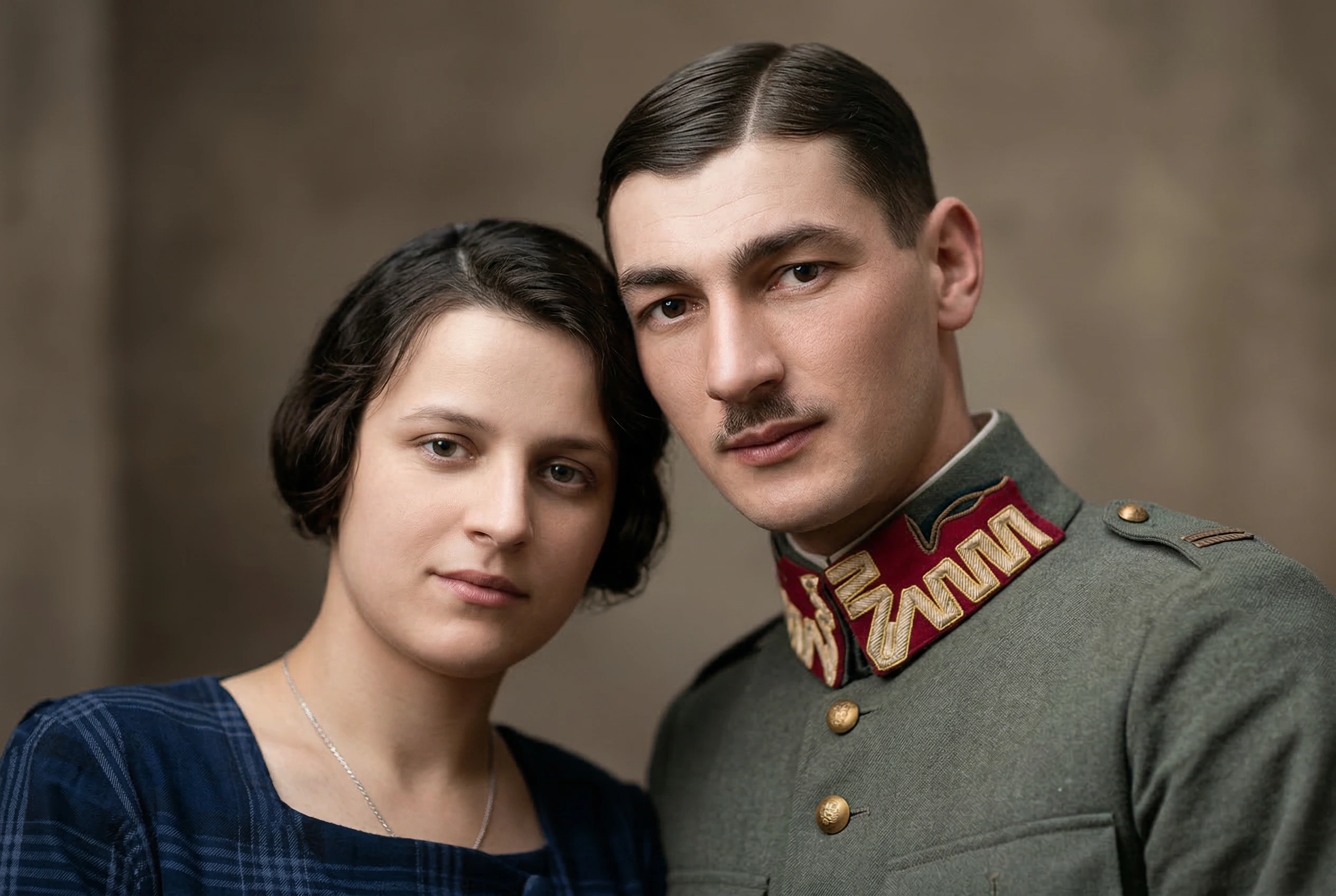
Prompt AI do odblurzania
Pełna przejrzystość: to jest dokładny prompt Nano Banana 2, którego używamy do odblurzania zdjęć:
“Popraw i odblurz ten obraz, zachowując oryginalną kompozycję, rysy twarzy, kolory, oświetlenie i naturalną teksturę. Przywróć ostre detale, popraw klarowność, zredukuj rozmycie ruchu i miękkość, a także spraw, by obiekt wyglądał czysto i w wysokiej rozdzielczości. Zachowaj realizm obrazu i unikaj zmiany tożsamości, tła, wyrazu, ani ogólnego stylu. Nie wygładzaj nadmiernie skóry, nie twórz sztucznych detali i nie zmieniaj żadnego tekstu ani obiektów na obrazie.”
Zasilane przez Nano Banana 2 i zoptymalizowane pod kątem realistycznego wyostrzania bez zmiany tożsamości, tła, wyrazu, tekstu ani obiektów.
Wyostrzanie zdjęć z realistycznymi detalami
Skoncentrowany proces AI do wyostrzania zdjęć, które są nieostre, poruszone, skompresowane lub poza fokusem.
Redukcja rozmycia ruchu i miękkości
Usuń drgania ręki, lekkie rozmycie ruchu, słabą ostrość i miękkie krawędzie obrazu, nie zamieniając zdjęcia w sztuczną ilustrację.
Zachowanie tożsamości i sceny
Nano Banana 2 jest zaprogramowane tak, aby zachować rysy twarzy, mimikę, tło, kolory, oświetlenie, tekst i obiekty, jednocześnie przywracając klarowność.
Opcje rozdzielczości dla każdego zadania
Wybierz wyjście 1K, 2K lub 4K w zależności od tego, czy potrzebujesz szybkiego podglądu, ostrzejszego posta na media społecznościowe, czy czystszego rezultatu w wysokiej rozdzielczości.
Masowe wyostrzanie zdjęć
Prześlij wiele rozmytych obrazów i przetwórz je w jednej kolejce. Każdy obraz jest przesyłany jako osobne zadanie Nano Banana 2, co zapewnia niezawodne wyniki.
Jak wyostrzyć zdjęcie online
Napraw rozmyte zdjęcia w trzech prostych krokach za pomocą narzędzia AI do wyostrzania obrazów Nano Banana.
Prześlij rozmyte zdjęcia
Przeciągnij i upuść obrazy JPG, PNG, WebP lub JFIF o rozmiarze do 30MB. Możesz dodać kilka zdjęć do przetwarzania wsadowego.
Wybierz rozdzielczość wyjściową
Wybierz 1K, 2K lub 4K. Nano Banana 2 następnie wyostrza detale, poprawia klarowność i redukuje rozmycie z zachowaniem stałego promptu.
Porównaj i pobierz
Przejrzyj porównanie przed i po, przełączaj się między wynikami wsadowymi, pobierz pojedyncze wyostrzone zdjęcie lub wyeksportuj wszystkie ukończone wyniki jako plik ZIP.
Proste i przejrzyste ceny Nano Banana
Wybierz idealny plan dla swoich potrzeb tworzenia obrazów AI.
Anuluj w dowolnym momencie
Początkujący
Oszczędź 30%Idealny do wypróbowania generowania obrazów AI i małych projektów.
Co zawiera
- 4200 kredytów generowania AI rocznie
- Modele Nano Banana
- Modele Nano Banana Pro
- Modele Seedream 4.5
- Modele generowania wideo Veo 3.1 & Sora 2 & Wan 2.5/2.6
- Modele Flux Kontext
- Do 5 obrazów referencyjnych
- Do 2 zadań generowania wsadowego
- Nano Banana Pro do rozdzielczości 2K
- Usługa ulepszania obrazów 3x, 4x
- Standardowa prędkość generowania
- Standardowa stopa sukcesu
- Standardowe wsparcie klienta
- Licencja komercyjna
Idealny do eksperymentowania z generowaniem i edycją obrazów AI.
Pro
Oszczędź 50%Idealny dla twórców, projektantów i profesjonalistów treści.
Wszystko z Początkujący
- 19200 kredytów generowania AI rocznie
- Modele Nano Banana
- Modele Nano Banana Pro
- Modele Seedream 4.5
- Modele generowania wideo Veo 3.1 & Sora 2 & Wan 2.5/2.6
- Nieograniczone modele Flux Kontext
- Do 10 obrazów referencyjnych
- Do 10 zadań generowania wsadowego
- Nano Banana Pro do rozdzielczości 4K
- Usługa ulepszania obrazów 3x, 4x
- Priorytetowa prędkość przetwarzania
- Wysoka stopa sukcesu
- Szybki kanał pobierania
- Priorytetowe wsparcie klienta
- Nieograniczona licencja komercyjna
🔥 Oferta ograniczona czasowo! Zdobądź Pro teraz
Premium
Oszczędź 50%Dla zespołów, agencji i komercyjnego użytku dużego wolumenu.
Wszystko z Pro
- 66,000 kredytow / Rok
- Modele Nano Banana
- Modele Nano Banana Pro
- Modele Seedream 4.5
- Modele generowania wideo Veo 3.1 & Sora 2 & Wan 2.5/2.6
- Nieograniczone modele Flux Kontext
- Do 10 zadań generowania wsadowego
- Do 10 obrazów referencyjnych
- Nano Banana Pro do rozdzielczości 4K
- Usługa ulepszania obrazów 3x, 4x
- Najszybsza prędkość generowania
- Najbardziej zaawansowane możliwości edycji AI
- Permanentne przechowywanie obrazów
- Dedykowany opiekun konta
- Nieograniczona licencja komercyjna
Idealny dla zespołów i firm
W przypadku pytań dotyczących płatności skontaktuj się z naszym zespołem pomocy:Skontaktuj się z nami
Płać bezpiecznie i pewnie z





FAQ: Odblurzanie zdjęć AI
Odpowiedzi na często zadawane pytania dotyczące używania Nano Banana do odblurzania zdjęć online.
Jak odblurzyć zdjęcie online?
Prześlij rozmazane zdjęcie, wybierz rozdzielczość wyjściową i kliknij „Odblurz zdjęcie”. Nano Banana 2 poprawia ostre detale, redukuje rozmycie ruchu i miękkość, a następnie zwraca porównanie przed i po, gotowe do pobrania.
Czy AI może odblurzyć detale zdjęcia bez zmiany twarzy?
Prompt do odblurzania został zaprojektowany tak, aby zachować tożsamość, rysy twarzy, wyraz, kolory, oświetlenie, tło, tekst i obiekty. Poprawia klarowność, unikając nadmiernie wygładzonej skóry i sztucznych detali.
Czy to narzędzie do odblurzania zdjęć jest darmowe do wypróbowania?
Nowi użytkownicy otrzymują darmowe kredyty po rejestracji. Każde zadanie odblurzania zużywa kredyty Nano Banana 2 w zależności od wybranej rozdzielczości: 1K, 2K lub 4K.
Czy mogę odblurzyć wiele zdjęć jednocześnie?
Tak. Obszar roboczy obsługuje przesyłanie wielu obrazów i przetwarzanie wsadowe. Darmowi użytkownicy mogą przetwarzać jedno zdjęcie naraz, podczas gdy użytkownicy Pro i Premium mogą przetwarzać do pięciu zdjęć w jednej partii.
Jakie rodzaje rozmazanych zdjęć działają najlepiej?
Najlepsze są zdjęcia z łagodnym lub umiarkowanym rozmyciem, drganiami aparatu, miękkim fokusem, miękkością kompresji lub słabo zdefiniowanymi krawędziami. Ekstremalnie nieczytelne obrazy mogą nie zawierać wystarczającej ilości informacji wizualnych do dokładnego odzyskania.
Czy AI zmieni tekst lub obiekty na moim zdjęciu?
Prompt wyraźnie instruuje Nano Banana 2, aby nie zmieniał tekstu ani obiektów. Jak w przypadku każdej edycji obrazu AI, zawsze przejrzyj wynik przed użyciem go w produkcji lub oficjalnych dokumentach.
Jaką rozdzielczość powinienem wybrać do odblurzania zdjęć?
Użyj 1K dla szybkich podglądów, 2K dla zrównoważonej jakości i kosztów kredytów, a 4K, gdy potrzebujesz czystszego obrazu w wysokiej rozdzielczości do druku, archiwizacji lub szczegółowej recenzji.
Czy mogę używać odblurzonych zdjęć komercyjnie?
Możesz używać wygenerowanych wyników zgodnie z Twoimi prawami do oryginalnego obrazu i warunkami Nano Banana. Upewnij się, że masz pozwolenie na edycję i używanie źródłowego obrazu.
Odkryj więcej Narzędzia AI
Poznaj podobne narzędzia i zachowaj twórczy rytm.

Skaler obrazu AI
Popraw rozdzielczość zdjęć dzięki skalowaniu AI

Usuwanie tła AI
Błyskawicznie usuwaj tła ze zdjęć z pomocą AI

Rozszerzenie przeglądarki
Zintegruj możliwości Nano Banana z Twoją przeglądarką

Renowator starych zdjęć AI
Przywróć starym, wyblakłym zdjęciom jakość lustrzanki dzięki AI
Zmień prawie-zdjęcie w perełkę
Zredukuj rozmycie ruchu, odzyskaj detale twarzy i wyostrz niewyraźne zdjęcia z naturalnym wykończeniem, zamiast przetworzonego wyglądu.